
Indicator groups
Up to four small indicators, such as the battery or the date, in one style.
An indicator group is a set of four small indicators, called A, B, C and D, that share one style. Each shows a value you pick: the watch battery, the date, the weather, your steps, your heart rate or the moon. It’s a quick way to add a few readings to a watch face without drawing anything.
Two indicator groups as the add button makes them:
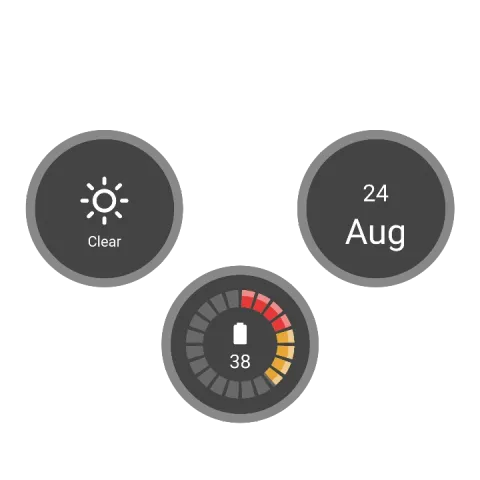 As it's addedThe weather (A), the battery (B) and the date (C), each on a background with a bed. D is off.
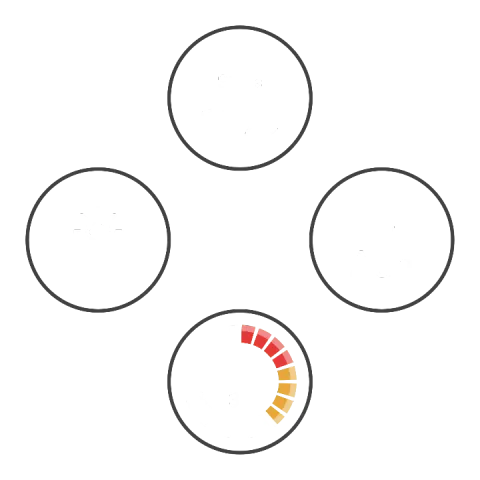 Line only, with stepsBackground and Bed off, so only the line around each indicator is left, and D set to steps.
Adding one
Section titled “Adding one”Tap the add button above the element list and pick Indicator group. It’s added right away, with settings that work: open its settings with the settings button on its row to make it yours. There’s nothing to draw.
Settings
Section titled “Settings”Indicator A
What indicator A shows, or None to leave it out. The battery comes in several styles.
Opens the indicator picker.
Line
SwitchDraws the line that connects the indicators.Background
SwitchGives each indicator a round background.Bed
SwitchDraws a soft gradient behind each indicator’s content.Outer value
SwitchDraws a ring around each indicator that fills with its value, like a small gauge.Link these settings
SwitchKeeps all four the same size: change one, and the others follow.Linked: while this is on, changing one changes the others.
- Size indicator A
- Size indicator B
- Size indicator C
- Size indicator D
Link these settings
SwitchKeeps the left and right indicators the same distance from the center, sideways.Linked: while this is on, changing one changes the others.
- X indicator A
- X indicator C
Link these settings
SwitchKeeps the left and right indicators at the same height.Linked: while this is on, changing one changes the others.
- Y indicator A
- Y indicator C
Link these settings
SwitchKeeps the top and bottom indicators lined up, sideways.Linked: while this is on, changing one changes the others.
- X indicator D
- X indicator B
Link these settings
SwitchKeeps the top and bottom indicators the same distance from the center, up and down.Linked: while this is on, changing one changes the others.
- Y indicator D
- Y indicator B
Tap actions
Tap action A
What happens when you tap indicator A on the watch.Opens the tap action picker.
Not available on the ambient face.
Tap action B
What happens when you tap indicator B.Opens the tap action picker.
Not available on the ambient face.
Tap action C
What happens when you tap indicator C.Opens the tap action picker.
Not available on the ambient face.
Tap action D
What happens when you tap indicator D.Opens the tap action picker.
Not available on the ambient face.
Below these are the position and animation cards every element has.